
StemDeckDJ Store for artists
Sell your music to the DJs who mix with stems
Free to join. Paid tracks for artists in the US and 40+ countries Stripe pays out to; free tracks from anywhere.
Why artists sell on the StemDeckDJ Store
StemDeckDJ is a free DJ app for Mac, Windows and Linux with stem separation built in. Its store puts your tracks in front of the DJs using it, straight from you, with no label or distributor in between.
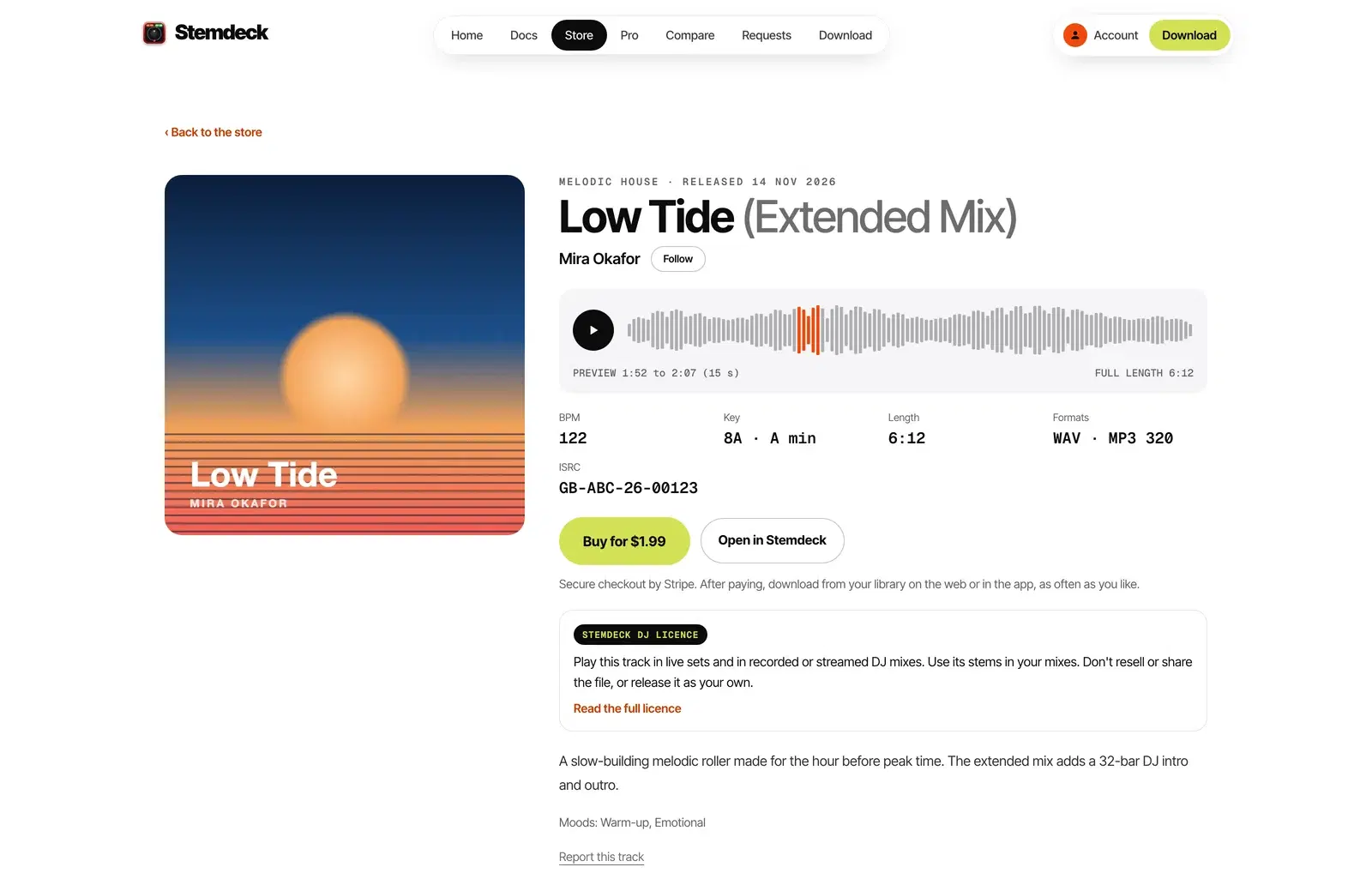
DJs who mix with stems
StemDeckDJ splits every track into vocals, drums, bass and more on the DJ's own computer. Your track arrives with BPM and key analysed, ready to layer, loop and blend in a live set or a mix.
Free or paid, at your price
Give a track away to grow a following, or sell it for anything from $0.99 to $50. You decide per track, and you can change a draft as often as you like.
A 15-second preview you choose
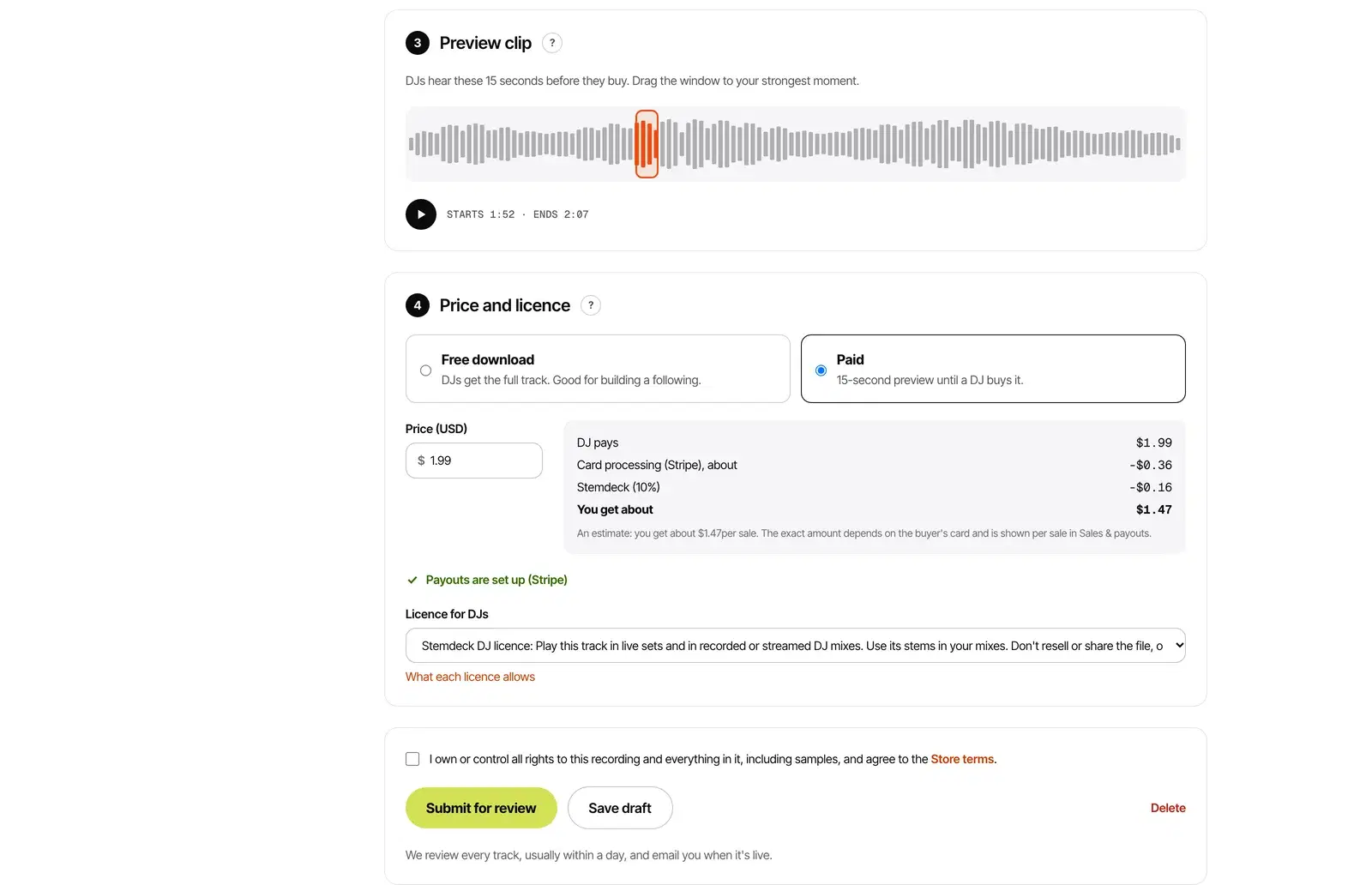
Drag the preview window to your strongest moment. DJs hear those 15 seconds before they get the track; the full file is never streamed.
90% of every sale after card fees
Stripe's card fee comes off first, then StemDeckDJ keeps 10% of what's left. The rest is yours, paid to your bank through Stripe.
See who plays it
Previews, unique DJs, sales, free adds, followers and deck plays, for the whole catalogue and for each track, so you know what's landing.
Reviewed, and licensed your way
Every track is checked by a person before it goes live, and you pick the licence DJs get: the StemDeckDJ licence, CC BY, CC BY-NC or Promo only.
How it works
- 1
Create your artist profile
Sign in with your email or Google, then add your artist name and country. It takes a minute, and your public artist page is ready straight away.
- 2
Upload a lossless file
WAV, AIFF or FLAC, 44.1 kHz or higher, 1 to 20 minutes, up to 400 MB. StemDeckDJ makes the 16-bit WAV, the 320 kbps MP3, the preview clip and the waveform for you.
- 3
Pick the preview, price and licence
Add the title, genre, BPM, key, artwork and an ISRC if you have one. Drag the 15-second preview into place, choose free or a price, and choose the licence.
- 4
We review it
We usually review within a day and email you when the track is live. If something needs fixing, you see the reason and can send it again.
- 5
DJs find it and play it
Your track shows on the StemDeckDJ Store at stemdeckdj.app/store and inside StemDeckDJ's Find music (from version 0.1.11), with its BPM, key and price on every row. It lands in the DJ's library ready to split into stems.
Every screen of the artist area, step by step, is in the artist guide.
Fees and payouts, plainly
- Joining and uploading are free, and free tracks cost you nothing.
- On a paid sale, Stripe's card fee comes off first. StemDeckDJ keeps 10% of what's left, and the other 90% is yours.
- Prices go from $0.99 to $50, in US dollars. Your share is paid in your own currency.
- Payouts go through Stripe to your bank account, monthly once your balance reaches $25 (or the same in your currency), or once the oldest earnings have waited 60 days, whatever the amount.
- Paid tracks are for artists in the United States and the other countries Stripe pays out to from our US account; the list is shown when you create your profile. Artists anywhere can publish free tracks.
Example: one sale
- A DJ pays
- $1.99
- Card processing (Stripe), about
- -$0.36
- StemDeckDJ (10% of the rest)
- -$0.16
- You get about
- $1.47
Stripe's fee is about 2.9% plus 30 cents and depends on the buyer's card, so the upload form shows this as an estimate. Your sales list shows the exact amount of each sale.
See how DJs use your music
Your dashboard covers the last 7, 30 or 90 days, each figure compared with the period before, with a daily chart and a table of your tracks. Click a track for its own numbers. DJs are counted per install, never by name.
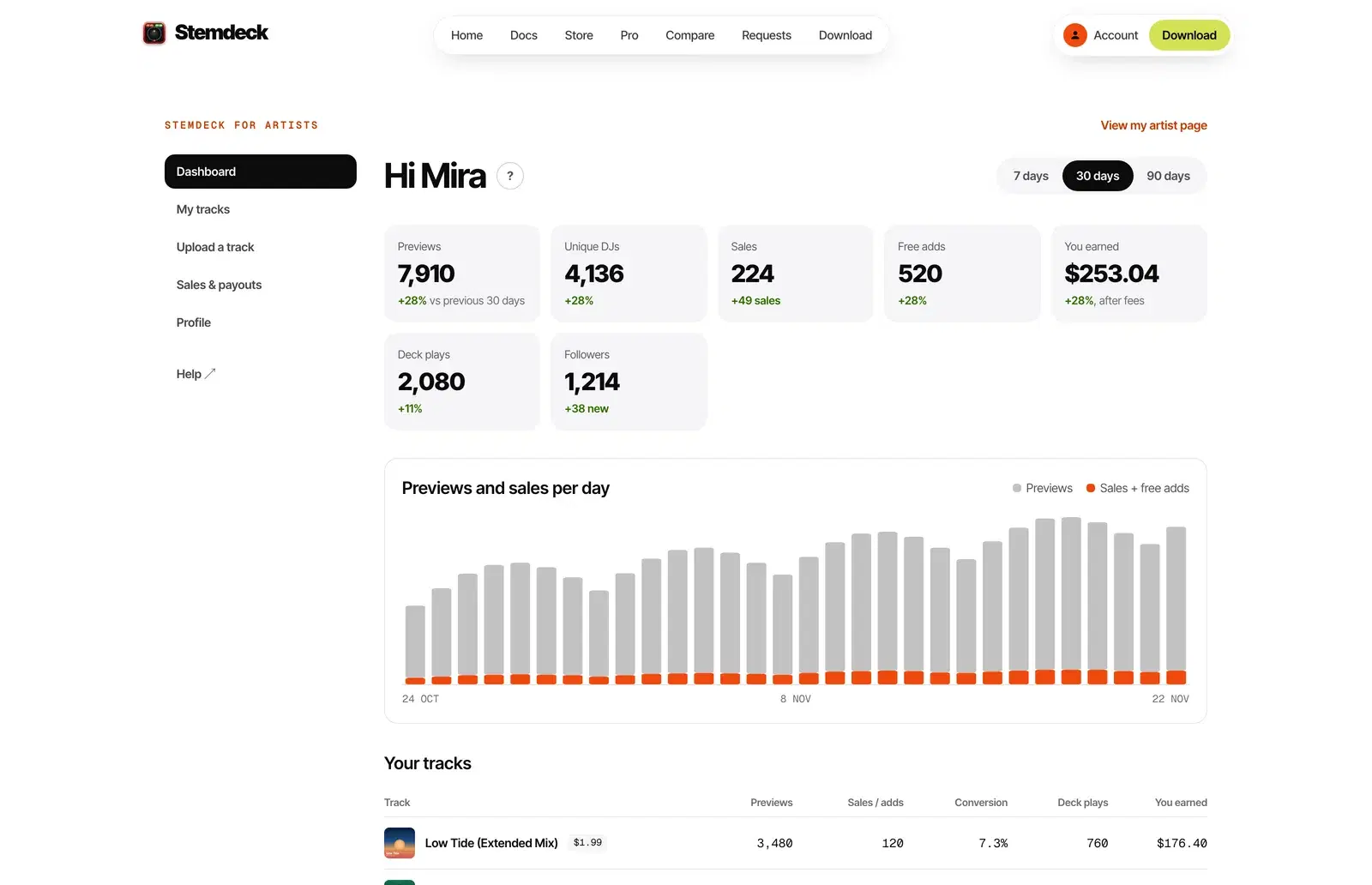
- Previews and unique DJs
- How many times your previews played, and how many different DJs heard them.
- Sales and free adds
- Every purchase and every free download, per day and per track.
- What you earned
- Your share after fees, in your payout currency.
- Deck plays
- When a DJ plays your track on a StemDeckDJ deck for 30 seconds or more (from DJs who share anonymous usage).
- Followers
- DJs who follow your artist page and hear about your next release first.
- Conversion
- Sales divided by the DJs who previewed, for each paid track.
Your music, your terms
You keep ownership of your music. Every track is reviewed before it goes live, so the store stays full of music its artists have the right to sell, with every sample cleared. You can take a track down at any time; DJs who already have it keep their copy.
- StemDeckDJ licence
- Play it in live sets and in recorded or streamed DJ mixes, and use its stems in those mixes. No resale or sharing of the file.
- CC BY 4.0
- Any use, including commercial, with credit to you.
- CC BY-NC 4.0
- Any non-commercial use, with credit to you.
- Promo only
- For DJs to play in sets and mixes, never to share, sell or release.
Questions from artists
Does it cost anything to sell on the StemDeckDJ Store?
Joining and uploading are free. On a paid sale, Stripe's card fee comes off first and StemDeckDJ keeps 10% of what's left. Free tracks cost you nothing.
How much do I get per sale?
About 90% of the price after Stripe's card fee. On a $1.99 track that's about $1.47. The exact amount of every sale is in your sales list, in your payout currency.
When do I get paid?
Your share collects in your own Stripe balance and is paid out monthly once it reaches $25 (or the same amount in your payout currency). Smaller balances roll over and are paid anyway once the oldest earnings have waited 60 days.
Which countries can sell paid tracks?
Payouts go to artists in the United States and in more than 40 other countries through Stripe, including Canada, the UK, the EU, Australia and Japan. Artists anywhere can publish free tracks.
Which file should I upload?
A lossless WAV, AIFF or FLAC file, 44.1 kHz or higher, between 1 and 20 minutes and up to 400 MB. StemDeckDJ makes the MP3 and the preview, and DJs download a 16-bit WAV or a 320 kbps MP3.
Do I need an ISRC?
No, it's optional. If your distributor or label gave you one, add it and it shows on the track page. The form checks the format as you type.
How does the preview work?
You pick where the 15-second preview starts by dragging a window on the waveform. Until you choose, it starts 30% into the track. DJs never hear more than the preview before they get the track.
Which licence should I choose?
The StemDeckDJ licence suits most releases: DJs can play the track in sets and in recorded or streamed mixes but can't share the file. CC BY and CC BY-NC are Creative Commons licences, and Promo only is for tracks that shouldn't go any further than a DJ's sets.
How long does review take?
Usually less than a day. We check that the track is yours to sell, including every sample, and that its details are right. If it isn't approved, My tracks tells you why so you can fix it and send it again.
Where do DJs find my tracks?
On the StemDeckDJ Store at stemdeckdj.app/store, where each track and each artist has its own page, and inside StemDeckDJ in Find music (the downloadable version, from 0.1.11). Free tracks download in full; paid tracks after checkout.
Can I take a track down?
Yes, at any time. It leaves the store straight away, and DJs who already have it keep their copy. Once a track is live its audio, preview and price are fixed, but the title, details and artwork can still change.
What about refunds?
A DJ can refund a purchase within 14 days, only if they never downloaded the file. Anything else is decided by us. A refund takes your share of that sale back.
Put your next release in front of DJs
Step by step help is in the artist guide. Questions: info@stemdeckdj.app.