
 Stemdeck
Use a DJ controller with MIDI learn
Stemdeck works with any MIDI DJ controller (on the Mac App Store version, from 1.1). There are no built-in presets: you map the controls you want with MIDI learn, in a minute or two, and Stemdeck remembers the mapping.
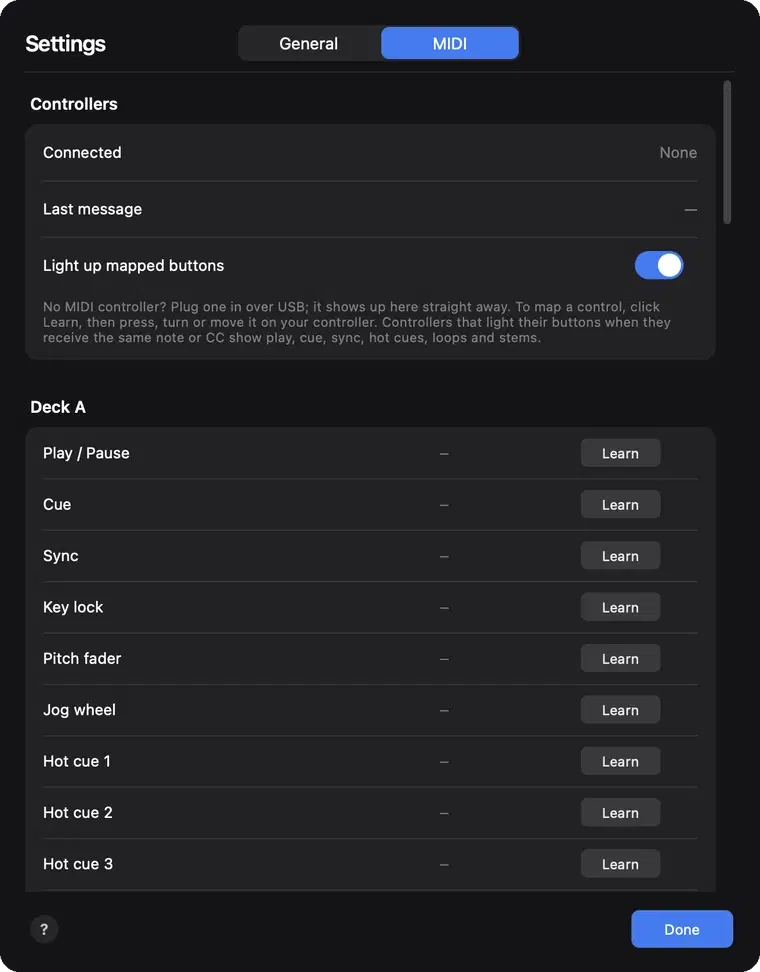
Connect
- Plug the controller in over USB. It appears under Controllers in Settings, MIDI (Command comma, or Ctrl comma on Windows and Linux) straight away, even while Stemdeck is open.
- Last message shows the most recent control you moved, which helps you check the controller is talking to Stemdeck.
Map controls with Learn
- Click Learn next to an action, then press, turn or move the control on your controller. The control appears next to the action.
- Each control does one thing: learning a control that's already mapped moves it to the new action.
- Jog wheels and endless knobs are recognised automatically. Tick Reverse if a fader, knob or wheel works the wrong way round.
- Click the cross next to an action to remove its control, or Clear all to start again.
What you can map
- Each deck: play, cue, sync, key lock, pitch fader, jog wheel, hot cues 1 to 4, loops of 1 to 16 beats, the stem pads (four or six), EQ high, mid and low, filter, channel fader, headphone cue, load, the Echo, Reverb and Crush effects and the effect amount.
- Mixer and library: crossfader, cue mix, headphone level, a browse knob or browse up and down buttons, and the six sound pads (Stemdeck Pro).
- While a deck plays, the jog wheel nudges its tempo like touching a platter. While it's paused, the jog wheel scrubs.
- The browse controls move through the library list on Live decks, and each deck's Load button loads the highlighted track.
Button lights
With Light up mapped buttons on, Stemdeck lights the controller's buttons to match the decks: playing decks, cue, sync, key lock, hot cues that are set, the active loop, stems that are playing, headphone cue, effects and held sound pads. This works on controllers that light a button when they receive the same note or CC it sends.
Save and share a mapping
Export mapping saves the mapping as a JSON file, and Import mapping loads one, so you can back it up or set up a second computer with the same controller.
Questions
Does Stemdeck include presets for my controller?
No. Map it once with MIDI learn and export the mapping to keep a copy.
Can I use two controllers?
Yes. Stemdeck listens to every connected controller, so you can map controls from both.
Try it in Stemdeck
Free downloads for Mac, Windows and Linux, with the stem models included. Coming soon to the Mac App Store for Macs with Apple silicon.