
 StemDeckDJ
Broadcast your set live
StemDeckDJ streams the master output straight from the Live decks to your channel, with your camera and the playing track on screen. No OBS needed. Broadcasting is in the downloadable version, from 0.1.11.
Free broadcasts run up to 30 minutes. With StemDeckDJ Pro there's no limit.
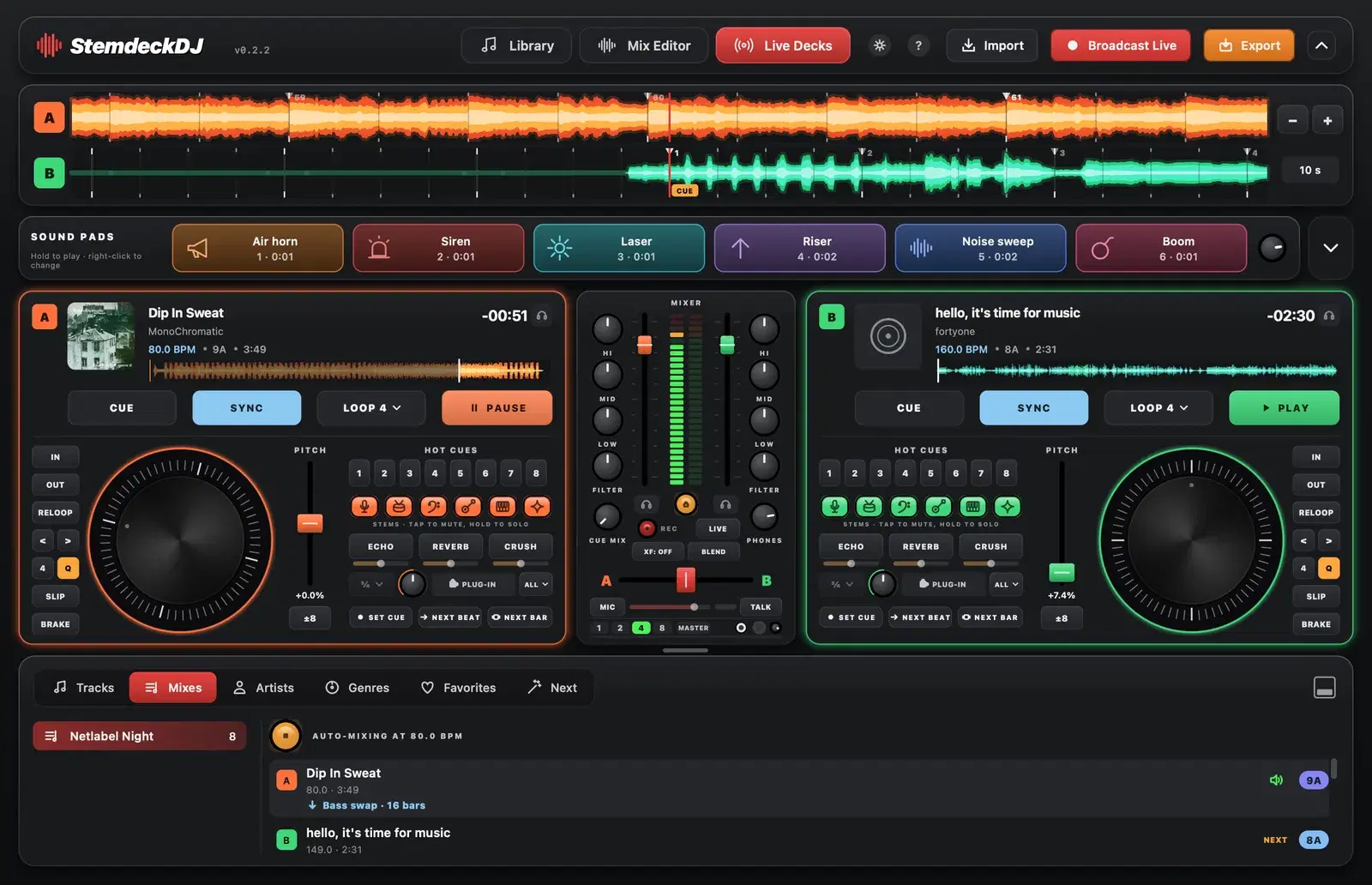
Open Broadcast live
- Click Broadcast live in the top bar, next to Export. Everything for a broadcast is in that window, and the LIVE pill in the top bar and the LIVE badge on the decks open it again while you're streaming. (Before 0.1.12 this was the Live tab in the decks' side panel.)
Choose a destination
- Twitch: paste the Primary Stream key from Creator Dashboard, Settings, Stream.
- YouTube: paste the stream key from YouTube Studio, Go live, Stream.
- Kick: copy both the Stream URL and the Stream Key from Kick's settings.
- Mixcloud Live: the server and stream key are under Go live, Live stream with OBS or other software. Live streaming needs a Mixcloud Pro account.
- Icecast radio: audio only. Enter the server's host, port, mount point (like /live) and source password, and optionally a station name and genre. The playing track's title is sent to the station.
- Custom RTMP: any RTMP or RTMPS server; the key is added to the end of the URL.
Stream keys stay on your computer
StemDeckDJ keeps stream keys and passwords in your system's secure store (the Keychain on Mac, Credential Manager on Windows, the Secret Service on Linux). The stream goes straight from your computer to the platform; StemDeckDJ's servers never see it.
Camera and overlay
- Under On the stream, type your DJ name and choose a scene: your camera full frame, the camera with a strip of the playing deck's waveform, Camera + deck (your camera big and the decks small in a corner), Deck + camera (the decks big, with you small in a corner; from 0.1.12), Deck (only the decks, no camera; from 0.2.2), or a card with the track's artwork when you don't want a camera. The deck scenes show the waveforms, decks and mixer as they move.
- The camera scenes and the card show the playing track's title and artist and your DJ name; Deck shows just the decks. Free broadcasts carry a small Streamed via www.stemdeckdj.app mark in the top right corner (from 0.2.2; before that it read Live with StemDeckDJ). StemDeckDJ Pro broadcasts have no mark.
- The camera is only used for the stream and its preview. On a Mac, allow StemDeckDJ in System Settings, Privacy & Security, Camera.
- Quality: Standard (720p) for most connections, Low (480p) for slower uploads.
Go live
- Click Go live. The status shows the time you've been live, the bitrate sent and, on a free broadcast, the time left.
- Free broadcasts end at 30 minutes, with a warning 5 minutes before. StemDeckDJ Pro has no limit.
- Rec works at the same time, so you can keep a WAV of the set.
- Click End broadcast when you're done. StemDeckDJ asks first, because the stream ends for everyone watching.
Copyright
Twitch, YouTube and Kick can mute a stream or strike a channel for playing commercial music without a licence. StemDeckDJ tells you once before your first broadcast to one of them. The Licence check in the Broadcast live window lists any track in your mix or on the decks without a stream-safe licence. StemDeckDJ Store tracks with the StemDeckDJ licence and Creative Commons tracks from Find music are safe to stream. Mixcloud Live licenses the music in DJ mixes, so commercial tracks are fine there.
If the connection drops
StemDeckDJ reconnects on its own and shows Reconnecting with the time until the next try. It keeps trying for 5 minutes before it ends the broadcast. After a reconnect on a slow connection it lowers the video bitrate.
The tracklist
When the broadcast ends, StemDeckDJ shows how long you were live and saves the tracklist in Music, Stemdeck Recordings. Click Copy tracklist to paste it into your stream's description, or Open recording if Rec was on.
Questions
Do I need OBS?
No. StemDeckDJ sends the audio and video to the platform itself.
How long can I broadcast for free?
Up to 30 minutes per broadcast. StemDeckDJ Pro removes the limit.
Will my stream get muted?
It can, on Twitch, YouTube and Kick, if you play commercial music without a licence. Use tracks with a stream-safe licence, or stream to Mixcloud Live, which licenses DJ mixes.
Does StemDeckDJ see my stream or keys?
No. The stream goes straight to the platform, and keys stay in your computer's secure store.
Try it in StemDeckDJ
Free downloads for Mac, Windows and Linux, with the stem models included. Coming soon to the Mac App Store for Macs with Apple silicon.