
 StemDeckDJ
Make stems for your SP‑404 or SP‑808
StemDeckDJ splits any track into six stems on your computer: vocals, drums, bass, guitar, piano and other. Export stems for SP sampler puts them on an SD card for Roland's SP-404MK2, SP-404SX or SP-404A, in the folder and format each one's manual gives, one stem per pad with the full track next to them. For the SP-808 and SP-808EX it makes files ready to sample in.
Cut them to a run of bars from the track's beat grid and the stems line up as loops. A read-me on the card lists which pad holds what. StemDeckDJ isn't affiliated with or endorsed by Roland: the model names only say which samplers the files are made for.
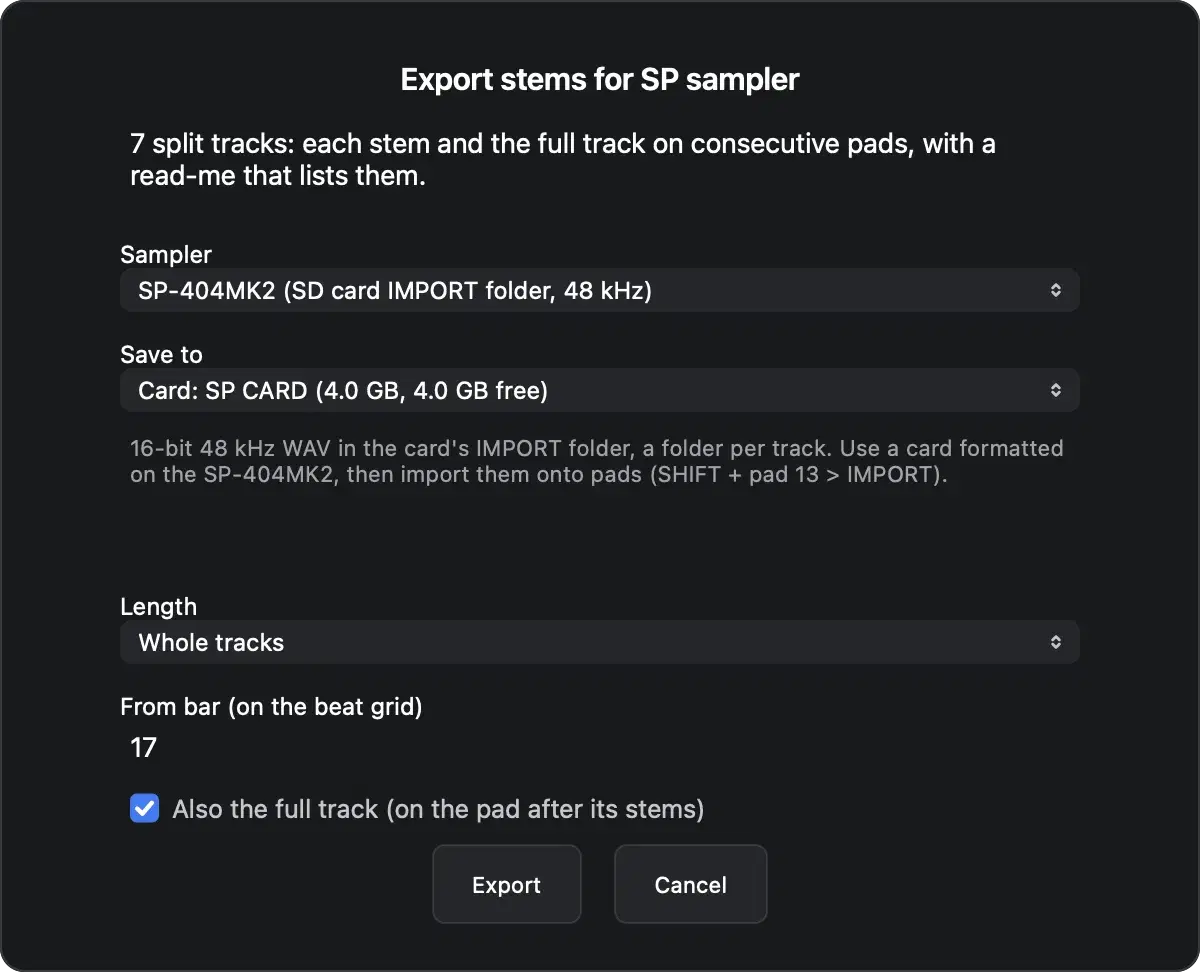
Export stems for SP sampler
- In the library, select tracks, right-click and choose Export stems for SP sampler. Tracks that aren't split yet start splitting; export them when they're ready.
- From the mix editor, right-click a track on the timeline and choose Export stems for SP sampler. If you've edited it in the mix (stem levels, drawn dots, automation, cue in or out), Export stems for SP sampler with these edits bounces it with those edits first.
- Sampler picks the SP-404MK2, the SP-404SX / SP-404A or the SP-808 / SP-808EX.
- Save to lists the SD cards and drives that are plugged in, with their free space. Choose a folder writes anywhere else, to copy to the card later: copy what's inside it to the card's root.
- Length: whole tracks, or 1 to 32 bars from the bar you pick, counted on each track's beat grid, so every stem starts on the same downbeat and loops cleanly.
- Also the full track puts the original on the pad after its stems.
- Free, coming in 0.2.6.
SP-404MK2
- Files go in the IMPORT folder at the card's root, a folder per track, as 16-bit 48 kHz WAV: the format the SP-404MK2's manual lists for importing from an SD card.
- Use a card formatted on the SP-404MK2. On the unit, hold SHIFT and press pad 13, then choose IMPORT, IMPORT from SD-CARD, SAMPLE. Pick the pad, open the track's folder with the VALUE knob and choose the file; SHIFT and VALUE pick several at once.
- Names are kept to 23 characters, the length of an SP-404MK2 sample name: 1 Vocals Go deeper, 2 Drums Go deeper and so on.
- The read-me suggests pads that keep each track in one bank: a six-stem track and its full track take seven pads, so two tracks share a bank of 16.
SP-404SX and SP-404A
- Files go in the card's /ROLAND/IMPORT folder as 16-bit 44.1 kHz WAV, numbered 001, 002 and so on. The unit imports files in name order, so the numbers put them on the pads in the order StemDeckDJ lists.
- Use a card formatted on the unit. StemDeckDJ warns when the card has no ROLAND folder, and when IMPORT already holds files that would be imported too.
- On the SP-404SX press FUNC and pad 3 (SHIFT and pad 3 on the SP-404A), choose bank A, press pad 1 and then REC. The unit fills the pads from there and empties the IMPORT folder.
- One import takes at most 120 files, so StemDeckDJ stops at 120. Roland's manual doesn't say whether an import carries on past pad 12 into the next bank; if yours stops there, import the rest from the next bank's pad 1.
SP-808 and SP-808EX
The SP-808 and SP-808EX record to Zip disks in Roland's own format and can't load files from a computer. StemDeckDJ makes a folder of 16-bit 44.1 kHz WAVs, CD quality, a folder per track. Play them into the unit's inputs (or its digital input with the expansion board, on a disk formatted at 44.1 kHz) and sample each one from the start: a track's stems all begin at the same moment, so they stay in time.
The pad map
Each export writes a text file at the card's root (StemDeckDJ SP-404MK2 pads.txt and so on) with the steps for that sampler and every file with its pad: A-1 Vocals, A-2 Drums, A-3 Bass and on. Stems come in the order vocals, drums, bass, guitar, piano, other, then the full track. Names use plain letters the units can show: Beyoncé becomes Beyonce.
Questions
Is this made by Roland?
No. StemDeckDJ isn't affiliated with or endorsed by Roland. It writes files in the folders and formats Roland's own manuals describe for the SP-404MK2, SP-404SX, SP-404A, SP-808 and SP-808EX.
Does it cost anything?
No. Stem separation and Export stems for SP sampler are free in the downloadable StemDeckDJ for Mac, Windows and Linux.
Can it make an SP-404MK2 project or put samples straight on pads?
Not yet. Roland doesn't document the project format, so StemDeckDJ uses the SD card import the manual describes and tells you which pad to choose for each file.
Which stems do I get?
Vocals, drums, bass, guitar, piano and other with six-stem separation (the default), or vocals, drums, bass and other with four, plus the full track if you want it.
Does it change my music files?
No. StemDeckDJ writes copies to the card or folder. Your library's files stay as they are.
Try it in StemDeckDJ
Free downloads for Mac, Windows and Linux, with the stem models included. Coming soon to the Mac App Store for Macs with Apple silicon.