
 StemDeckDJ
Groove: arrange phrases from your tracks into a new beat
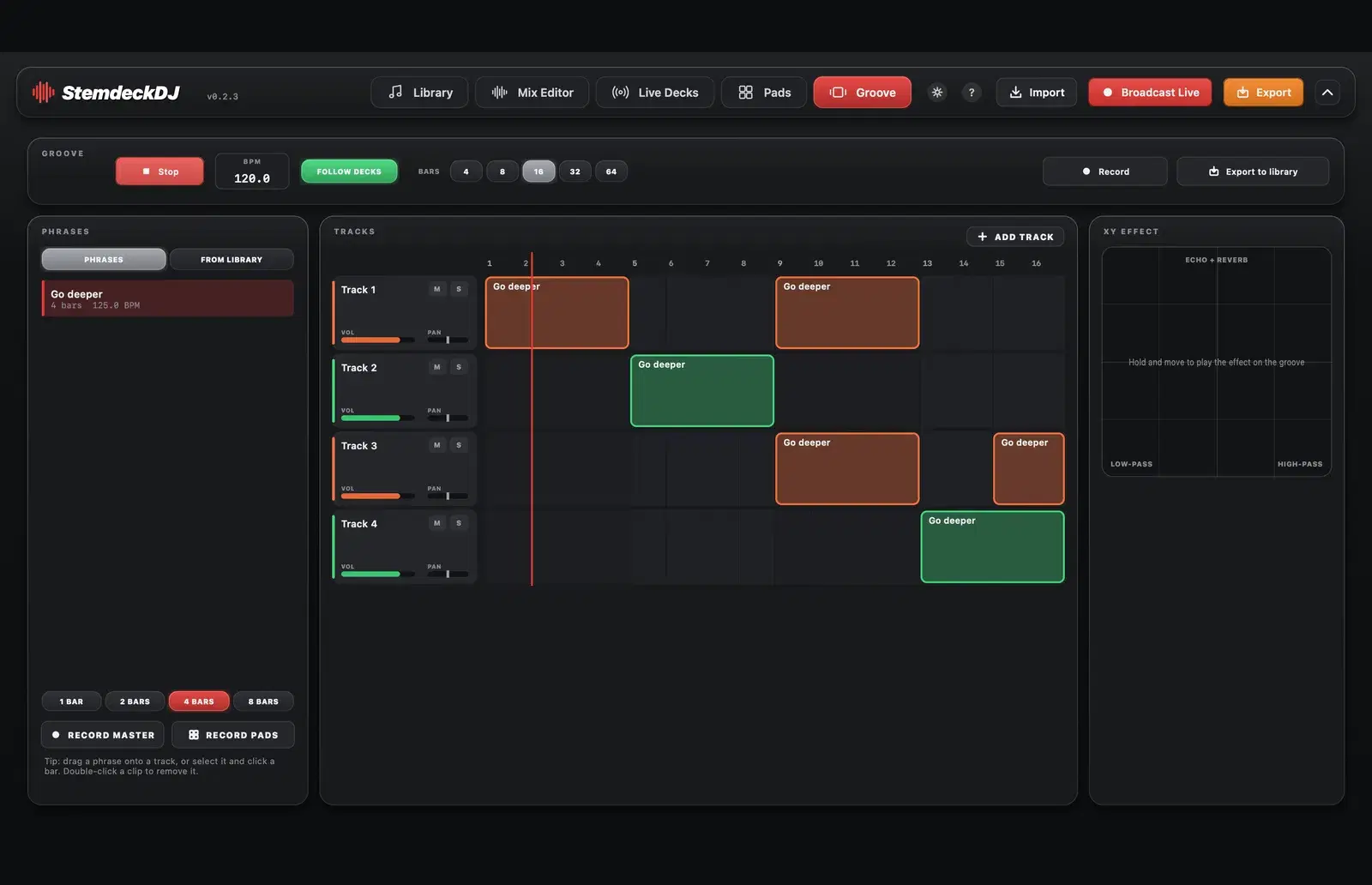
From 0.2.5, the Groove screen (the fifth tab, or Cmd+5 / Ctrl+5) builds a new beat out of phrases: a few bars taken from a track, one of its stems, your decks or your pads. Lay them out on up to eight tracks, play the groove in time with the decks, and export it to your library as a track you can mix.
Groove is part of StemDeckDJ Pro.
Make phrases
- FROM LIBRARY: pick a track (or one of its stems), the bar to start from and 1, 2, 4 or 8 bars, then add it as a phrase. Its tempo comes from the track's beat grid.
- RECORD MASTER records the decks as a phrase from the playing deck's next bar. RECORD PADS records the Pads screen's pattern the same way.
- Right-click a track to bounce it to a single phrase.
Arrange the groove
- Drag a phrase onto a track, or select it in Phrases and click a bar. Drag clips to move them; double-click one to remove it.
- BARS sets the groove's length (4 to 64 bars). It loops while it plays.
- Each track has M (mute), S (solo), VOL and PAN. ADD TRACK adds one, up to eight.
- Phrases are stretched to the groove's BPM without changing their pitch. FOLLOW DECKS takes the tempo from the playing deck and starts the groove on its next bar.
XY effect
- Hold and move on the XY pad: left and right sweep from a low-pass to a high-pass filter, up adds echo and reverb. Let go and the groove comes back clean.
Record and export
- Record captures what the groove plays, effect included, into your library when you stop.
- Export to library renders the groove once to a WAV in your library, ready for a deck or the mix editor.
- Map Groove: play/stop to a controller button in Settings > MIDI.
Record onto tracks
- Press R on up to four tracks to arm them, pick each one's input (MIC, the decks' microphone, or IN 1-2, your audio interface's first two inputs) in mono or stereo, and press Record take. Recording starts on the next bar, or at once, and the take lands on the track at the playhead.
- Turn on LOOP to record round a few bars again and again: each pass becomes a new take, or, with overdub, a new layer on top of the last. Undo the last layer (on the clip's menu) takes back one pass.
- Monitoring lets you hear the input while you play; StemDeckDJ moves takes back by your audio device's delay, so they land on the beat.
Edit clips
- Select a clip to open the clip editor under the tracks: trim its start and end, slide the audio inside it, set its gain, fade it in and out, reverse it, and change its pitch in semitones and cents without changing its length. The phrase itself never changes, and clips show their own waveform.
- Wherever an edit cuts into the sound, StemDeckDJ adds a tiny fade so it never clicks.
- Undo and Redo (Cmd+Z and Shift+Cmd+Z, Ctrl on Windows and Linux) go back and forward 12 changes to the groove.
Mix, bounce and the master
- Every track has its own fader, pan, mute, solo and meter. The master strip has the groove's volume, a meter and a limiter that keeps the groove from clipping.
- Bounce a track, or the whole mix as you hear it, to a new phrase or onto a track, from a track's menu. The source tracks are muted, so nothing plays twice.
- If a phrase's file goes missing, its clips are marked and Relink lets you point to the file again.
Questions
What's the difference between Pads and Groove?
Pads plays short sounds from 16 pads and a step pattern. Groove arranges longer phrases, from a bar to eight bars, on tracks over time. Record your Pads pattern into Groove to use both.
Can I use the exported groove in a DJ set?
Yes. Export to library adds it as a track: load it on a deck or put it in a mix. Only use music you have the rights to if you release it.
Is Groove free?
Groove is part of StemDeckDJ Pro ($0.99 a month), with Pads, the sound pads, the looper and plug-ins.
Try it in StemDeckDJ
Free downloads for Mac, Windows and Linux, with the stem models included. Coming soon to the Mac App Store for Macs with Apple silicon.