
 StemDeckDJ
Pads: a 16-pad sampler in your DJ software
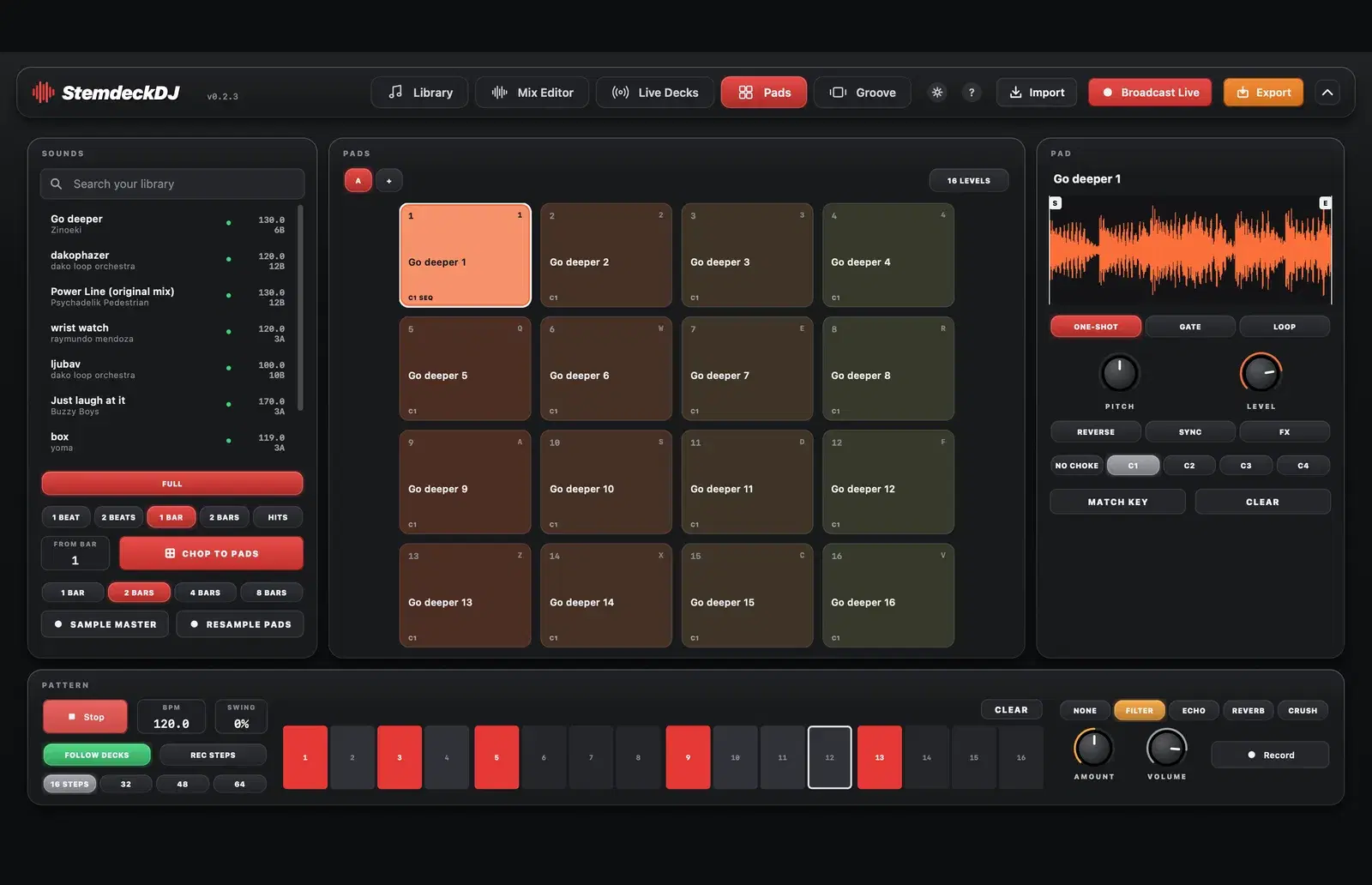
From 0.2.5, StemDeckDJ has a Pads screen (the fourth tab in the top bar, or Cmd+4 / Ctrl+4): a pad sampler built into your DJ software. Chop a track from your library, or just one of its stems, onto 16 pads, record a few bars of your decks onto a pad, and play them from the screen, your keyboard or a controller.
A step pattern plays the pads in time with whatever is on the decks, so a drum chop or a vocal stab lands on the beat. Pads is part of StemDeckDJ Pro.
Chop a track onto the pads
- Pick a track in Sounds on the left. FULL uses the whole track; the chips under it pick a stem instead (vocals, drums, bass and the rest) once the track is split.
- Choose how to cut it: 1 beat, 2 beats, 1 bar or 2 bars from the track's beat grid, or HITS to cut at the drum hits and notes. FROM BAR sets where the chops start (bar 1 is the first downbeat).
- Click CHOP TO PADS. The slices fill the pads from the selected one on, each named after the track.
- You can also drag a track from the list, or an audio file from your computer, onto any pad.
Sample your decks
- Pick 1, 2, 4 or 8 bars, select a pad and click SAMPLE MASTER: StemDeckDJ records what the decks play from the playing deck's next bar, so the sample starts on the downbeat and loops cleanly.
- RESAMPLE PADS records the pads themselves, with their effect, onto the selected pad: build a beat, then bounce it to one pad and play over it.
Play and shape each pad
- Click a pad, or use the keys shown on it: 1 2 3 4, Q W E R, A S D F and Z X C V. Banks A to Z each hold 16 more pads (the + adds one).
- The pad panel on the right shows the pad's waveform: drag S and E to set where it starts and ends.
- ONE-SHOT plays the whole sound, GATE plays while you hold the pad, LOOP repeats it while you hold it.
- PITCH (in semitones), LEVEL, REVERSE, SYNC (stretch the sound to the pads' tempo without changing its pitch) and FX (send the pad through the effect).
- Choke groups C1 to C4: pads in the same group cut each other off, like an open and a closed hi-hat.
- MATCH KEY pitches the pad to the key of the track playing on the decks. 16 LEVELS turns the pads into one sound at 16 pitches, a semitone apart, to play it as a melody.
Program a pattern
- Select a pad and click the steps where it should play; each bank has its own pattern of 16, 32, 48 or 64 steps. Space plays and stops it.
- SWING delays every second step for a looser groove. BPM sets the tempo, or FOLLOW DECKS takes it from the playing deck and starts the pattern on its next bar.
- REC STEPS: while the pattern plays, the pads you play go into it at the nearest step.
- VOLUME for all the pads sits at the bottom right, and Record captures what the pads play into your library. Effects live in the sound lab's buses (below).
Layer patterns
- Each bank has its own pattern. Turn on LAYER above the steps (or Shift-click a bank key) and that bank's pattern plays along with the selected bank's, so drums in A, bass in B and chords in C can all play at once.
- Every bank loops its own length on the same clock: a 16-step drum loop and a 32-step bass line stay in time.
- Layered bank keys show a dot, filled while that bank plays, and the steps show which banks are playing, such as Playing A + C. Changes take effect on the next step without stopping the music.
Sound lab
- Four buses (Drums, Bass, Music and Vox): each pad picks one. Every bus has a chain of up to three effects (filter, drive, compressor, chorus, phaser, crush, tape wobble, gate, echo and reverb), then low cut, a 3-band EQ, high cut, level, pan and mute. A master bus glues the mix and stops it clipping.
- Save your chains, or start from a preset, and resample a pad through its bus to print the effects into a new sound.
- Pad shape: an envelope (attack, decay, sustain, release) and a filter on every pad, with velocity driving level, brightness or length.
- Step details: give any step its own pitch, filter, pan and effect amount, a chance to play, or a ratchet of up to four hits. Hold G for fills and M to mute pattern rows while you play.
- Four modulators (sine, triangle, square, random or 16 steps, in time with the beat) move any knob: press Learn, then turn the knob. One modulator can drive another for sounds that keep changing.
- Perform: the XY effect on one bus or all of them, and eight scenes you can save and crossfade between. The sound lab is part of StemDeckDJ Pro.
Generate patterns
- Open the Generate tab under the pads, pick a mode and press Generate: the pattern goes into the selected bank, so it plays, layers and records like one you programmed. Again makes another with the same settings, Undo puts the last one back, and Lock pads keeps the rows you choose.
- Drums: a beat in one of eight styles (boom bap, house, trap, drill, drum and bass, lo-fi, reggaeton, afrobeats), with Density for how busy and Complexity for ghost notes, syncopation, hat rolls and fills. It finds the kick, snare and hats from the pads' names and, on the Drums bus, from the sounds. Tempo sets the kit to suit the style.
- Pulses spreads a few hits evenly over each of a few pads, each on its own cycle, for interlocking rhythms. Variations makes one to three versions of the bank's pattern on the next banks, the last ending in a fill.
- StemDeckDJ Pro adds Melody (or Bassline) in a key and scale, Chords (on the selected pad plus copies on spare pads, or arpeggiated), Vocal chops (a rhythm over chopped vocal pads), Rebound and Texture.
- Rebound opens a box of bouncing balls: each part of the edge plays a pad (or, with Notes, a note of the scale). Change the balls, zones, gravity and speed, throw a ball by dragging, then Capture 1, 2 or 4 bars into the pattern. Thin out drops the weakest hits.
- Texture makes a new sound from tiny grains of the selected pad, with grain size, density, position, spray and pitch spread.
Video lessons 26 to 28: generate patterns, step by step
Render to pad
- Render pattern turns the bank's pattern, through its buses and effects, into a loop on a pad that plays in time with the kit. Render variations does the same for each variation, and Render chords puts each bar's chord on its own pad to play by hand. Choose 1, 2, 4 or 8 bars.
- New sounds (renders, textures, resampling through a bus) go to the selected pad when it's empty, otherwise to the next empty pad. Rendering is part of StemDeckDJ Pro.
The Notes view
- Press NOTES above the steps to see the selected pad's steps as notes: pitch upwards, steps across. Click an empty cell to add a note, click a note to remove it and drag it up or down to change its pitch. + and - move by an octave.
- It's the easiest way to write a melody or bass line on one pad, or to fix a generated one.
Synth
- The pad editor's Synth tab makes a synth sound for the selected pad: two oscillators (sine, triangle, saw, square or noise) and a sub an octave below, a resonant four-pole low pass with its own envelope, an amp envelope, drive, the note and how long it's held.
- Start from a preset (Bass, Sub bass, Lead, Pluck, Pad, Keys, Brass, Noise hit), change it, then Make sound. Play it at other pitches with 16 levels, Melody, Chords or the Notes view. The synth is part of StemDeckDJ Pro.
Note length, nudge and pattern tools
- Every step has a length and a nudge. Gate and loop pads and instruments let go after the length (in 24ths of a step, up to 16 steps); nudge moves a hit up to 11/24 of a step early or late, on top of swing. In the Notes view drag a note's right edge to set its length and Alt-drag it sideways to nudge it, or use the Length and Nudge lanes under the steps.
- Tools (above the steps) works on the selected pad or, with All pads, the whole bank: Quantise to 1/4, 1/8, 1/16, 1/32 or triplets, Shift by up to 16 steps, Double, Halve, Reverse, Humanise (small random timing and velocity changes) and Transpose by up to 12 semitones.
- Undo and Redo (Cmd+Z and Shift+Cmd+Z, Ctrl on Windows and Linux) go back and forward 12 changes to patterns and pads.
Recording
- Rec steps records what you play into the pattern. Record modes: Normal; Chromatic, where the pads play the selected pad at 16 pitches and record them; and 16 velocities, where the pads play it at 16 levels of loudness.
- The ... key next to Rec steps opens the record mode, New notes and the metronome. New notes sets how recorded notes land: quantise (off, 1/16, 1/8, 1/32, 1/16 triplets) and a fixed or played velocity and length.
- The metronome clicks on the beat with an accent on the bar, always, only while recording, or never, with a count-in of up to 2 bars. It is never in Pads recordings or resamples.
- Click another bank while the pattern plays and it starts when the current pattern ends (its key blinks); Cmd-click (Ctrl-click) switches at once. Wave shows the last 2 seconds of the pads, or the selected pad, over the steps.
Instruments
- A pad can hold an instrument instead of a sample. The Inst tab picks the engine: Bass, Poly, FM, Wave, Mallet and Perc, and the drum engines Kick, Snare, Clap, Hats, Rim, Tom and Bell, each with its own knobs and presets.
- Instruments play live and in chords (up to 8 notes a pad), from 16 levels, the Notes view, the arpeggiator or a MIDI keyboard, through the pad's bus, shape and effects. The Knobs lane under the steps locks any knob for one step.
- Print to sample turns the pad's note into a sample. Instruments are part of StemDeckDJ Pro; printing is free.
Kits
- Kits (in the pad editor's Inst tab) fills the bank with a drum kit made by the drum engines: Boom, Dust, Trap, House, Electro, Minimal, Garage and Classic analog. Each has a kick, snare, clap, closed and open hats (the open hat cuts off the closed one), a rim, toms, percussion and a bell, named so Generate's Drums mode knows them.
- Loading a kit over pads that have sounds asks first. Kits are free; changing their instruments' knobs is part of StemDeckDJ Pro.
Arpeggiator
- The Arp tab plays the notes you hold (in 16 levels or on a MIDI keyboard) and the pad's own steps as a moving line: Up, Down, Up-down, Random, Order played, Chord, Converge, Diverge, Pinky, Thumb, and Up-down with the ends repeated.
- Set the rate (1/4 to 1/32, with triplets), gate, one to three octaves and a scale the notes snap to. Hold keeps it going after you let go, and Print writes what it plays into the pattern. The arpeggiator is part of StemDeckDJ Pro.
Mixer
- The Mixer tab has a strip for each pad of the bank: level, pan, a meter, mute and solo, and the bus it plays through. Solo lets only the soloed pads play.
- EQ opens a 3-band equaliser for the pad: low shelf, a mid band with frequency and width, and high shelf, up to 15 dB each way. The per-pad EQ is part of StemDeckDJ Pro.
Sidechain
- In the Buses tab, Duck makes a bus duck when another bus or one pad plays, such as the bass under the kick. Set the threshold, ratio, attack, release and how far it ducks, and watch the source and the reduction live. Sidechain is part of StemDeckDJ Pro.
Effect automation
- Arm Rec auto, play the pattern and turn a knob: its moves are recorded into the bank, one value per step, smoothed in between. Overwrite replaces earlier moves and Overdub keeps them where you don't touch the knob.
- The Auto lane under the steps shows each recorded knob: draw in it to change it, or clear one lane or all. Up to 16 knobs per bank, from bus effects and EQ to levels, pad filters and instrument knobs. Effect automation is part of StemDeckDJ Pro.
Song mode
- The Song tab strings banks together: add the selected bank, set how many times each plays (1 to 16), drag to reorder and choose whether the song loops or stops at the end. Play song plays it in order with the playing entry lit, and Record records it.
Effects and solo
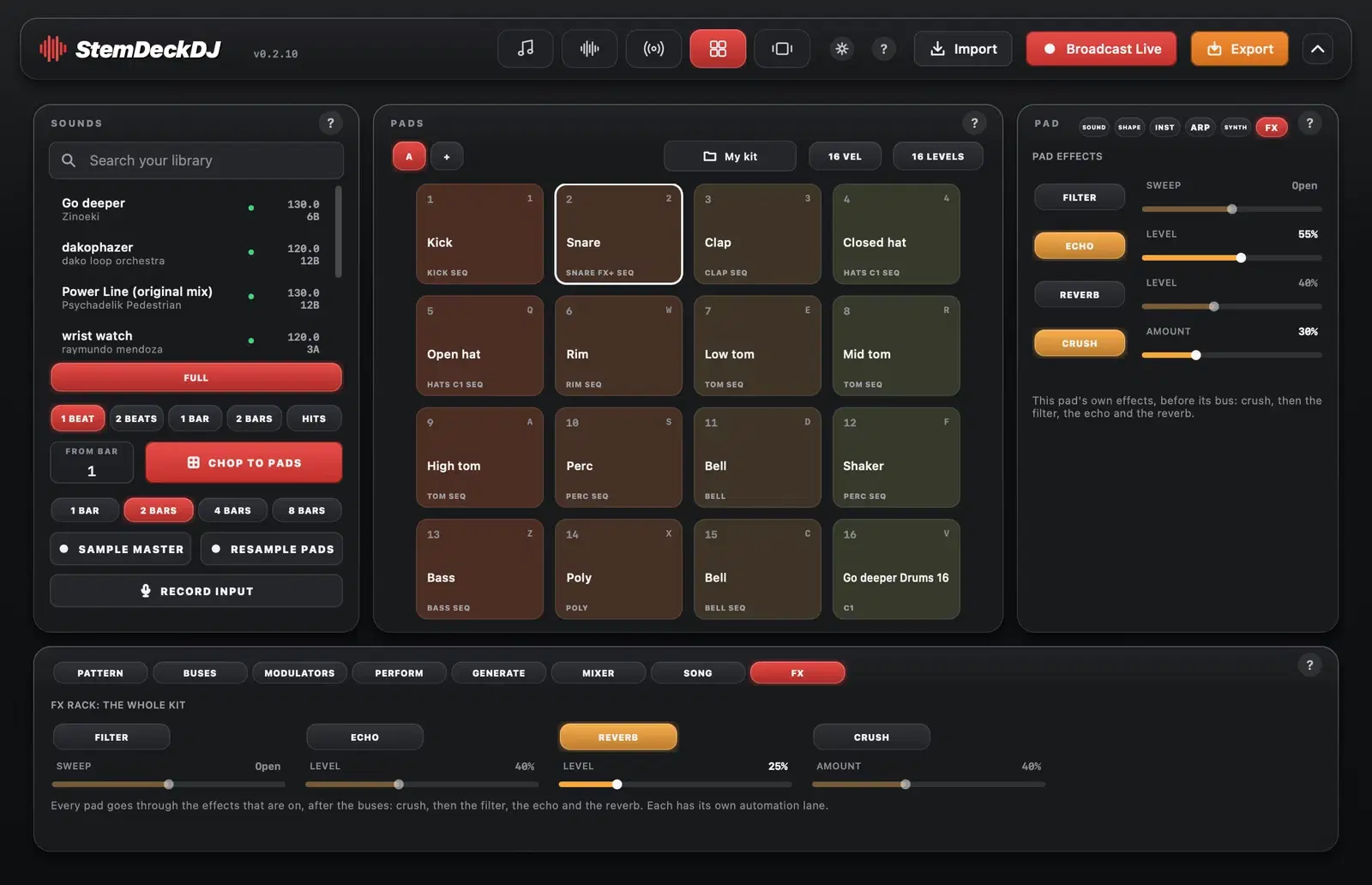
- The FX tab at the bottom has a Filter, an Echo, a Reverb and a Crush for the whole kit, after the buses. Turn on any of them together, each with its own level. Each one can record its own automation lane.
- Each pad can have its own effects too: the pad editor's FX tab has the same four, just for that pad, before its bus. A kick can stay dry while the snare echoes. Pads with their own effects show FX+. Up to 16 pads can have them at once.
- Solo while held: hold O (or click Solo by Mute) and click pads. Only the pads you pick are heard, the rest of the pattern goes quiet. Let go of O (or click Solo again) and everything plays, in time.
Sessions
- The key next to 16 LEVELS shows the session you're in. A session is a whole kit: pads, banks, patterns, tempo and the sound lab. Open its menu to start a new session, save this one under a new name, rename or delete it, or open another. You can keep up to 99.
- Sessions save as you go. Your kit from before sessions is the session My kit.
Record an input and normalise
- Record input (in Sounds) records MIC 1, as you set it up on the decks, onto the selected pad for 1, 2, 4 or 8 bars, from the pattern's next bar while it plays. Turn the microphone on in Settings > Microphones first if you haven't.
- Normalise (in the pad editor) raises or lowers the pad's sound so its loudest point is -1 dB, as a new copy of the sound.
Controllers
- In Settings > MIDI, map Pads: pad 1 to 16 to your controller's pads and Pads: play/stop to a button.
Questions
Is Pads free?
Pads is part of StemDeckDJ Pro ($0.99 a month). The decks, the mix editor and stem separation stay free.
Can I chop just the vocals or the drums?
Yes. Once a track is split into stems, pick a stem under FULL before you chop, or drag a stem onto a pad.
Do the pads stay in time with the decks?
With FOLLOW DECKS on, the pattern takes the playing deck's tempo and starts on its next bar, and pads with SYNC on are stretched to that tempo.
Where are my pads saved?
In StemDeckDJ's data folder, under Sampler: the kit and every sample, so they're there next time you open the app.
Try it in StemDeckDJ
Free downloads for Mac, Windows and Linux, with the stem models included. Coming soon to the Mac App Store for Macs with Apple silicon.